Submitting and receiving sensitive data in a support ticket

What is sensitive data and why is it used?
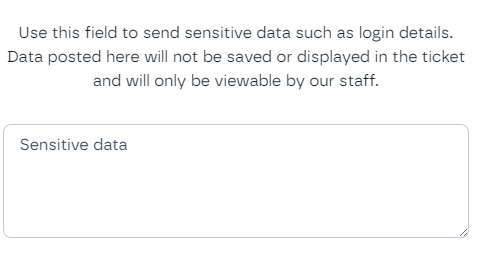
There are likely to be occasions we will need to exchange sensitive data with you. We may ask you to send us some login details - or we may need to send you an updated password for example. In these cases we will request that you send these via the Sensitive Data section of the ticket, rather than in the ticket message itself.
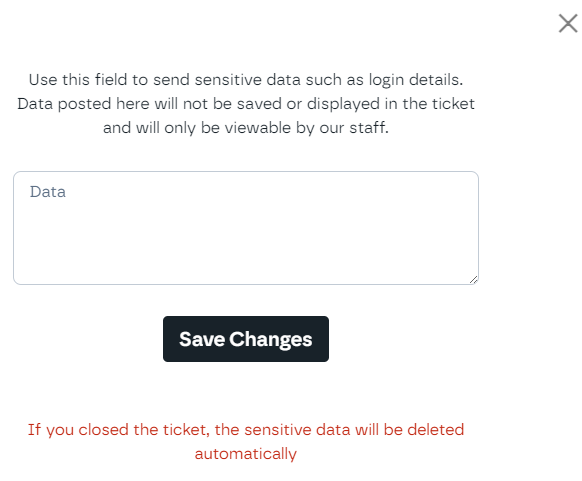
Data sent via the sensitive data section is encrypted. It is not saved or displayed in the ticket itself and is only viewable by our support staff, and it is deleted automatically once the ticket is closed.
Sending sensitive data to the support team
Sensitive data is added to a ticket after the ticket has been created.
- Open your ticket as normal, leaving any passwords or login details out of the Message field.
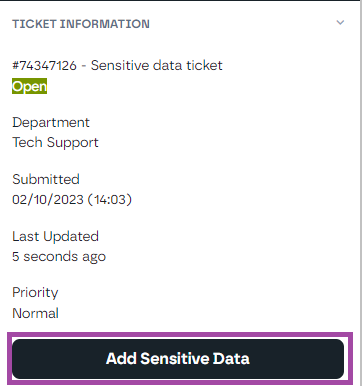
- Once the ticket has been created, open it and click Add Sensitive Data in the Ticket Information panel.
- Enter the details you need to send us, then click Save Changes.
- Reply to your ticket to let the support team know the data has been added.
Receiving sensitive data from Krystal
If we need to send you sensitive data, open the ticket and use the sensitive data button in the Ticket Information panel. It reads Add Sensitive Data until data has been added to the ticket, and View or Edit Sensitive Data once it has.
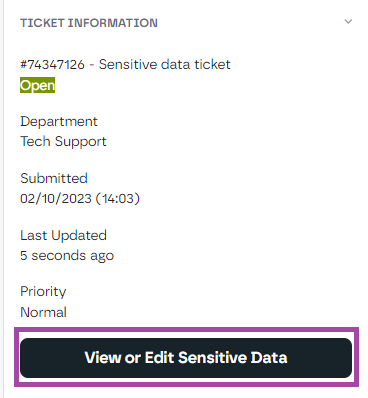
Open it to see the data that has been added by the support team.